From raw footage to a finished edit.
Vynts is an AI-assisted video editor for Mac, with an agent built into the workflow. Direct the work, refine every decision, and finish faster without losing control.
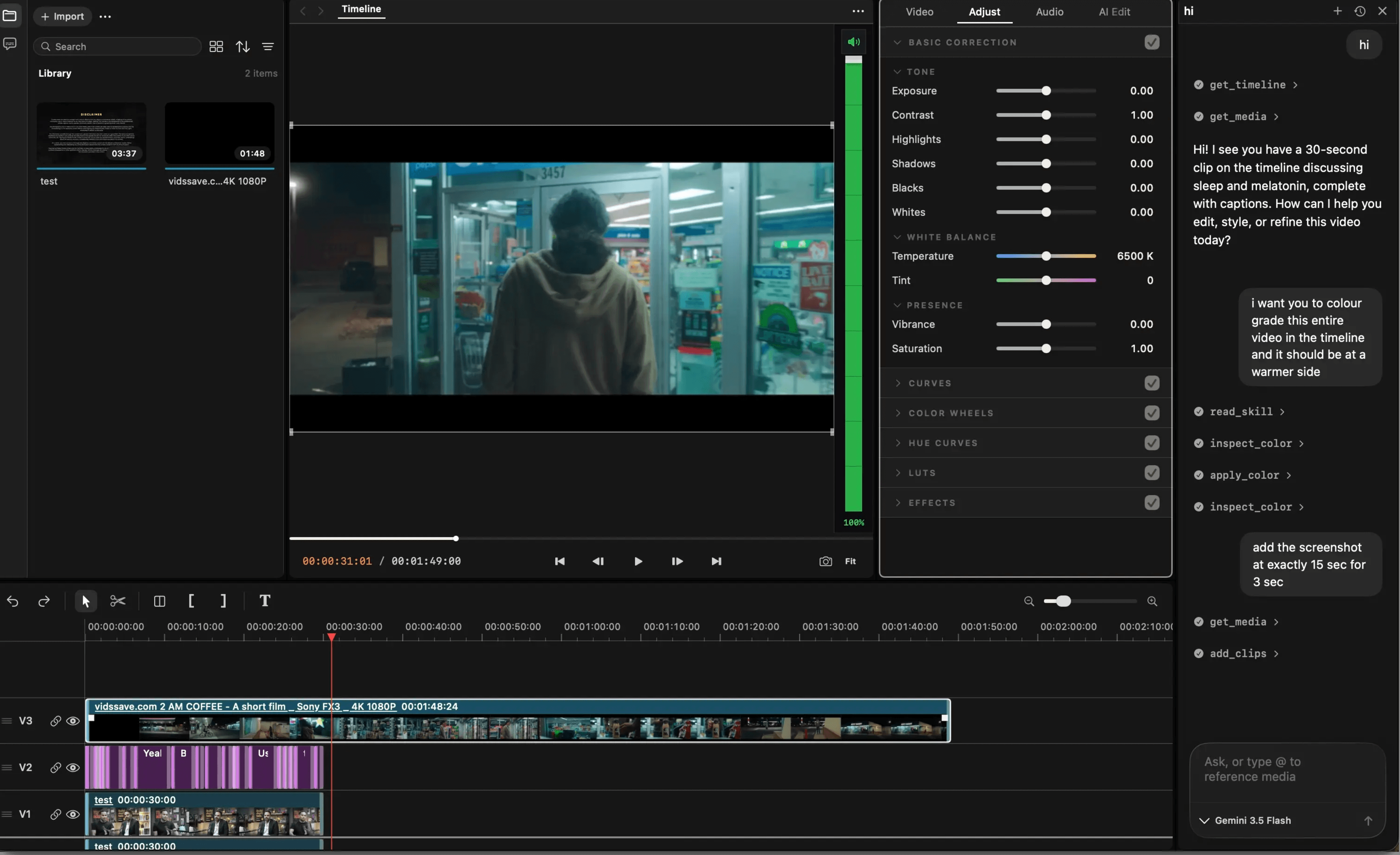
Vynts is an AI-assisted video editor for Mac, with an agent built into the workflow. Direct the work, refine every decision, and finish faster without losing control.
 OpenAI Gym
 Anthropic
 ElevenLabs
 Vox
Vox MiniMax
 Crunchyroll
 Overleaf
 EditorConfig
 Freelancer
Keep footage, tasks, and timeline decisions organized from import to export.
Make precise changes on a real timeline and stay in charge of every edit.
Reduce repetitive setup and routine edits so the project keeps moving.
Tell Vynts what you want to change. The agent understands your instruction, structures the task, and carries it out inside the project.
Import raw footage, audio, and assets. Vynts keeps everything structured so the project starts clean and stays easy to navigate.
Add captions, make quick refinements, and polish the cut without interrupting your editing flow.
Grade color, clean audio, and refine timing with precise controls built for a finished result.
Review the project, choose the right output settings, and produce a polished file ready to share or deliver.
Review the agent’s plan, follow every editing task as it runs, and keep completed or failed work organized in one place.
V0.4.6 · AUG 2, 2026Trim faster, keep connected clips aligned, and make frame-accurate multitrack changes with more reliable undo history.
V0.4.0 · JUL 21, 2026Refine word-level timing, save reusable styles, and keep every caption synchronized while the timeline changes.
V0.3.2 · JUL 11, 2026Bring in large media folders, preserve their structure, and begin editing while analysis and proxies continue in the background.
V0.3.0 · JUN 30, 2026Vynts automates the complete post-production workflow while keeping every cut, grade, refinement, and export in your hands. Shape scenes, tracks, timing, transitions, and versions with frame-level precision. Generate, style, retime, and refine captions that stay locked to every cut. Turn creative direction into assemblies, cuts, reframes, and complete sequences.Balance cameras, set the look, and keep color consistent across the story, while keeping every important decision in your hands.
Vynts is built for solo creators, professional editors, agencies, social teams, and marketing teams. Automate repetition while keeping frame-level control, then deliver client edits, versions, and revisions faster from one focused Mac editing workflow. Less busywork · faster final cut.
How the agent plans, acts, and stays under your direction inside the editor.
Agent Manager is the control center for work you give the Vynts agent. It keeps planned, active, completed, and failed editing tasks together, so you can understand what is happening without searching through the timeline.
The agent reads your request in the context of the open project, turns it into a sequence of editing steps, shows the plan when the task is complex, and then applies those steps inside the editable project.
Yes. Agent work remains visible in the project and can be reviewed like any other edit. Multi-step tasks create clear checkpoints, letting you refine the result or return to an earlier state without rebuilding the sequence.
All of it. Vynts can handle repetitive assembly, captions, reframing, cleanup, and versioning, while the timeline, timing, picture, sound, and final delivery decisions remain editable by you.
No. You can direct work through the agent, use the timeline and professional controls yourself, or move between both approaches. The agent accelerates the workflow; it does not replace the editor.
The current beta is free for approved users and runs on Apple silicon Macs. Access, download instructions, supported macOS versions, model connections, and any future pricing details are provided together when your invitation is approved.
Bring in your footage, guide the agent, refine the timeline, and export the finished version from one focused Mac editor.